
Dell XPS 14 (2026) Review Summary: How Much Is It? OLED? Battery Life? Keyboard?
Dell's XPS 14 is back with Panther Lake chips and an OLED option. Here is what three reviews say about price, battery, performance and the new keyboard.
By TechnoWorld360 Editorial TeamPublished
- Format
- Explainer
The short answer
The Dell XPS 14 (2026) starts at around $1,600 and uses Intel Panther Lake processors with an optional 2.8K OLED touchscreen, and the reviewed OLED configuration costs about $2,200. Notebookcheck rates it 87 percent and Tom's Guide calls it a return to form, while Gizmodo criticizes the seamless keyboard, soldered memory and a price close to faster laptops. Battery results vary widely, from about 12 hours of web browsing to about 6 hours of active use.
Overview
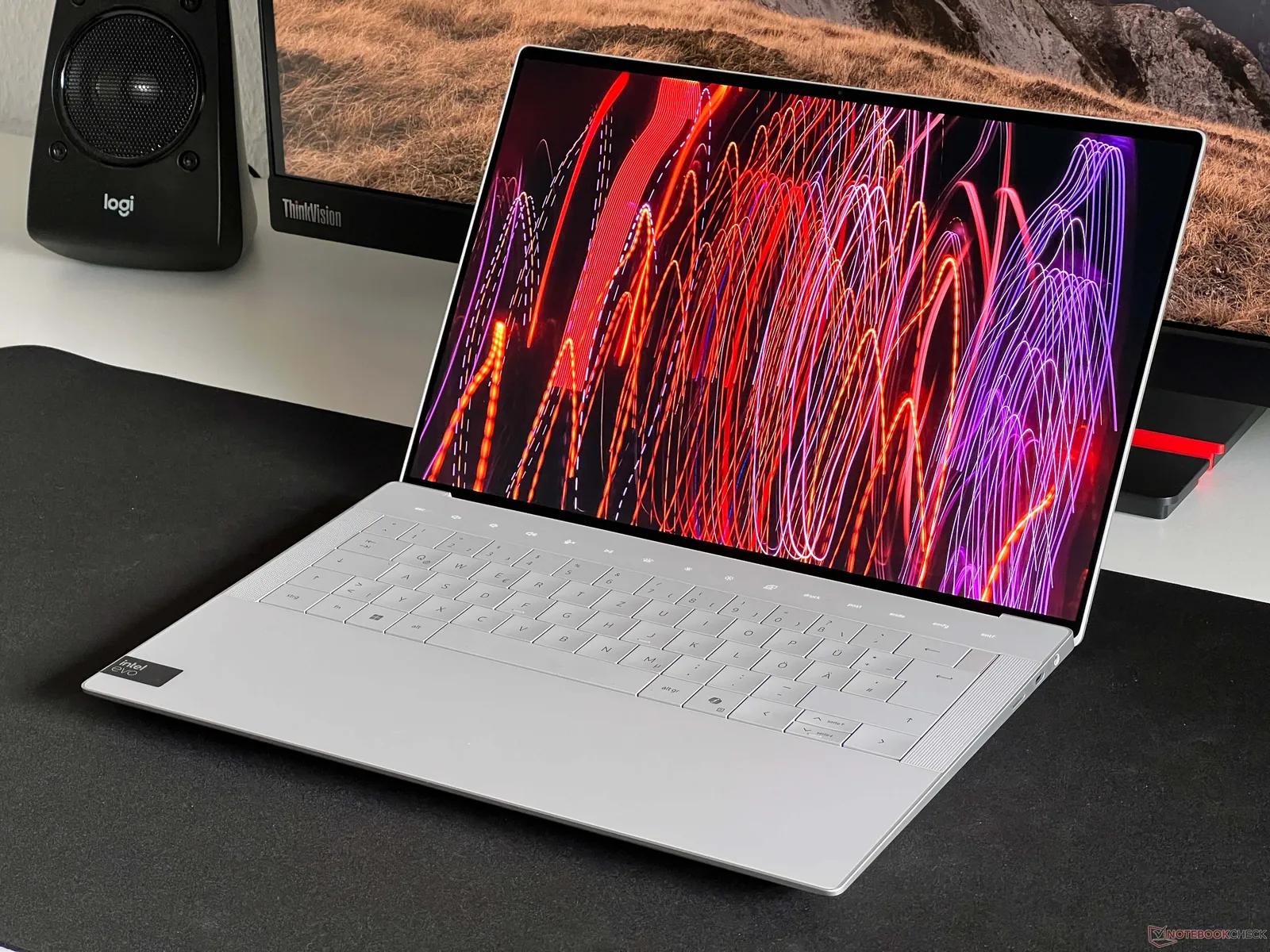
Dell have returned to their XPS name with this 14 inch laptop with Intel Panther Lake processors. All three reviews were broadly positive but mixed on the specifics.
Tom's Guide calls it a return to form and gives it its highest recommendation. Notebookcheck rates it good at 87 percent and calls it the most refined XPS revision so far. Gizmodo rates it a 4 on a scale it does not state, praises the screen and graphics, and says the seamless keyboard is the main drawback.
Prices start between $1,500 and $1,700 depending on the source. The OLED model all three reviewed costs about $2,200. All three reviewers note that the price is close to laptops that are faster, with Tom's Guide pointing to the 14 inch MacBook Pro with the M5 chip, which it says starts about $600 less.
SlashGear said that Dell brought back the XPS brand at CES 2026. Notebookcheck said that it was easier to recommend this version over the 2025 Dell 14 Premium. Therefore it has somewhat become a return to form for the XPS 14.
This article will compare the three reviews. We'll highlight differing points about battery life, brightness and weight. We've not tested this.
Price
Tom's Guide said it starts at $1,599 on Dell's website, with an Intel Core Ultra 5 325 chip, 16GB of memory, a 512GB SSD and a 14 inch 1,920 by 1,200 non-touch LED display at 1 to 120Hz. Notebookcheck gives the base price as $1600. Gizmodo said it starts at $1700 with a Core Ultra 7 355 and 1200p IPS LCD.
However, the configuration we tested had a Core Ultra X7 358H, 32GB of RAM, 1TB SSD and 2880 x 1800 Touch OLED panel. Tom's Guide said this configuration cost $2,199, Notebookcheck at about $2200 whereas Gizmodo said it cost $2200.
Notebookcheck said that there was a top version with a Core Ultra X9 388H. Gizmodo mentioned it will be available at a later date, but no timeframe was given. Notebookcheck said it would only get a marginal improvement of around 5-10% over the X7 358H.
The price information is not fully consistent. Tom's Guide's own price box lists $1,499 at Dell and $1,999 at Amazon for a 3TB SSD model, which does not match its starting price. T3, reviewing the XPS 13, lists the XPS 14 at $1,999. Confirm the current price and configuration on Dell's site before you buy.
Processor
Tom's Guide said it uses Intel Panther Lake processors (18A node) with integrated Intel Arc graphics. Notebookcheck said it uses a 16-core 16-thread processor (X7 358H), with 4 performance cores up to 4.8GHz, 8 efficiency cores and 4 low power efficiency cores. It runs at 30W sustained and 69W peak. It has Arc B390 graphics with 12 Xe3 cores.
Tom's Guide said it scored 2867 single core and 16927 multi-core on Geekbench 6. It's faster than the last model (15794 multi-core) but slower than the M5 MacBook Pro. It was able to run a 4K to 1080p HandBrake conversion in 4 minutes 32 seconds compared to 5 minutes 6 seconds on the last model. Photoshop was faster but Premiere Pro was slower.
Notebookcheck said it scored 2927 single core and 17121 multi-core on Geekbench 6.7. It scored 18932 on Cinebench R23 multi-core, which is just above the average score of 18086 for this CPU. It had some throttling in a Cinebench loop of around 25%. The CPU was performing within ~5% of the Core Ultra 7 255H so if you own one then you won't see a large improvement.
Gizmodo was not as impressed when comparing to Apple. It said it was slower than the Apple chips, scoring around 800 points less in single core and 1600 points less in multi-core on Geekbench 6. It took over 6 minutes to run the 4K to 1080p conversion with Handbrake compared to just over 2 minutes on the MacBook Air. The HandBrake times were different between the three reviews which is to be expected as they were using different files.
The graphics are great. Gizmodo said it was faster than the M5 with raytracing. Notebookcheck said it was similar to an RTX 4050 with good power efficiency.
Integrated Graphics Performance
Tom's Guide said it ran Borderlands 3 at 36fps, Cyberpunk 2077 at 14.9fps native and around 60fps at 1080p with Intel XeSS. Shadow of the Tomb Raider ran at 39fps which is slower than the last model (50fps) which had a discrete Nvidia GPU.
Gizmodo said it ran Cyberpunk 2077 at high settings at around 31fps native 1200p. With XeSS it ran at around 50fps. Other demanding games struggled at 1080p/1200p.
Overall it can run a lot of games at medium settings but it's definitely not a gaming laptop. If you want high frame rates in demanding games then go for a discrete GPU laptop. The last model had a discrete GPU in Tom's Guide's comparison and the one we looked at had integrated graphics.
OLED Screen
All three were impressed with the OLED. Tom's Guide said it was a standout with great contrast and HDR. Gizmodo praised how good the contrast was. Notebookcheck said it had 100% of sRGB and 99.7% of Display P3.
Brightness is varied between the reviews. Tom's Guide said it had 355 nits in SDR and 381 nits in HDR. This was not as bright as the last Dell 14 Premium or M5 MacBook Pro. It was tuned to improve efficiency and longevity. Notebookcheck said it had an average of 389 nits with a max of 396 nits. It had 1104 nits in HDR. Gizmodo said it had 400 nits. This would be bright enough to use in shade or direct sunlight. However, Notebookcheck said the display would be okay to use outside in the shade but bad in direct sunlight. This is conflicting but the specific numbers from Notebookcheck.
Notebookcheck said there was some PWM flicker at 240.62Hz with 29% amplitude. This would be noticeable to some users. Neither of the other reviews mentioned this.
The screen is 14.0 inches meaning it's smaller than the last model which was 14.5 inches. Both Tom's Guide and Notebookcheck mentioned this as a downside. It has a resolution of 243ppi with 120Hz refresh rate, touch screen and variable refresh rate.
There's a cheaper LCD version available with a 1200p screen. Gizmodo said it was a little brighter than the OLED but was nothing special. Tom's Guide said it had much longer battery life.
Battery
Tom's Guide said the OLED had a battery life of 12 hours 23 minutes in a web browsing test at 150 nits. The LED had a battery life of 20 hours 41 minutes. The Dell 14 Premium had 8 hours 16 minutes, the M5 MacBook Pro had 18 hours, the Samsung Galaxy Book 6 Pro had 15 hours 17 minutes and the Asus Zenbook Duo had 14 hours 23 minutes.
Gizmodo said it had around 6 hours of active use. The OLED didn't have as long a battery life as the LCD but it did have a good battery life.
Notebookcheck said it had a long battery life. However, there were no figures given on the page we viewed. It has a 70Wh battery.
The difference between 12 hours and 6 hours isn't a mistake. The web test with idle times would be less demanding than active use with a higher brightness. Depending on what you use your laptop for this may be more accurate to you. The LCD had the longest battery life in Tom's Guide's test.
Keyboard & Trackpad
This is where the reviews differed the most. Gizmodo said the seamless keyboard was uncomfortable with near flat keys and a slight dip in the centre. It had a snappy feel and was dust resistant but was prone to multi-key accidental presses. Notebookcheck said it had a soft and shallow keyboard. The arrow keys were tight. Tom's Guide said it had a Zero-Lattice keyboard with 0.8mm travel and had no complaints.
They all mentioned the physical function keys have returned. This replaces the capacitive function keys on the 2024 model which were difficult for low vision users. Tom's Guide said it had a dedicated escape key.
It had a haptic trackpad with engraved lines around the edges. Gizmodo said it was too large and had issues with palm rejection causing accidental clicks. Notebookcheck said it could be more responsive. It measures around 15.2cm x 7.5cm.
If you're a heavy typist then we'd recommend trying the keyboard in store. This is a personal preference and the reviews show how much people's preferences vary.
Design, Weight & Ports
Tom's Guide said it had a CNC aluminium chassis with rounded edges. It weighed 3.0lbs meaning it was around a pound lighter than the last model. Gizmodo said it weighed 3lbs (OLED) and 3.05lbs (LCD). It had a thickness of 0.58 inches. Notebookcheck said it weighed 1.444kg (3.18lbs). The weight varied slightly which is likely due to different configurations.
There are limited ports. It has 3 Thunderbolt 4 ports, headphone jack, Wi-Fi 7 and Bluetooth 6. There's no SD or microSD reader which Tom's Guide and Notebookcheck mentioned as a downside. Gizmodo said there were limited ports. Tom's Guide mentioned the MacBook Pro version had an SDXC card slot.
Notebookcheck said it had an 8 megapixel webcam (upgraded from 2MP on the Dell 14 Premium). There was no physical privacy shutter. Gizmodo said it had a clear 1080p webcam compared to colleagues. It had a quad speaker system (10W total) which was great for sound and bass.
Serviceability: Notebookcheck said it had a keyboard deck to remove to access the motherboard. It was slightly harder to service. Gizmodo said it had soldered memory so couldn't be upgraded. Notebookcheck said it had 75% recycled aluminium covers.
Storage, Wi-Fi & Materials
Notebookcheck ran some tests and said the 1TB Samsung PM9C1b SSD had a sequential read/write speed of around 7037MB/s and 5595MB/s respectively. It had no throttling. Tom's Guide said it had a read speed of 4809MB/s and a write speed of 3779MB/s. These are using different tools and test files so aren't directly comparable but it is a fast drive.
Wi-Fi 7 is standard. Notebookcheck said it had a transmit speed of around 1440Mbps and a receive speed of 1740Mbps on the 6GHz band. It had a 844Mbps transmit and 765Mbps receive speed on 5GHz. This was using an intel BE211 adapter. In practice your home network would probably be the limiting factor.
It had a max latency of 872.4 microseconds for DPC. It had minimal issues and no frame drops when playing 4K 60. This is only really an issue for people who do audio recording/editing.
Materials: It had 75% recycled aluminium covers, 50% recycled cobalt battery, 90% recycled steel keyboard and 10% recycled glass on the OLED touchscreen. It had 100% recycled copper components on the circuit board.
It came with Windows 11 Pro and had a 12 month warranty (Notebookcheck). Check what warranty you'll get in your region as it can vary.
Comparison to MacBook
All the reviews compared it to a MacBook. It wasn't favourable on price. Tom's Guide said the 14-inch M5 MacBook Pro had better performance and battery life. It was around $600 cheaper to start and had a card slot.
Gizmodo had a headline saying Dell almost made a MacBook. It had more of an Air feel to it compared to previous XPS models. This is due to the locked down hardware, limited ports and price. It lost to Apple on CPU performance but won on the integrated graphics. The MacBook Air M4 (1TB, 16GB) costs $1400. It's lighter (2.7lbs) and thinner (0.44inches). However, it doesn't have a fan like the XPS.
Overall if you wanted a Windows laptop with a touch OLED screen and good integrated graphics then this would be the one to go for. If you wanted raw CPU performance, battery life and price then go for the Mac.
Pros & Cons
Pros: Refined and practical design. Vibrant dual OLED screen. Great performance from Panther Lake. Great integrated graphics. Great speakers. Long battery life for a Windows laptop (Tom's Guide and Notebookcheck).
Cons: No microSD or SD slot. Smaller 14.0 inch screen. Uncomfortable, shallow keyboard (Gizmodo and Notebookcheck). Soldered memory. Limited ports. Throttling under load. Potential PWM flicker on the OLED. Expensive compared to more powerful laptops.
No privacy shutter on the webcam. Only opens to around 140 degrees.
Who should buy?
If you want a premium Windows laptop with a bright OLED touchscreen, great integrated graphics and classic XPS design and don't mind the limited ports then this would be for you.
If you want the cheapest option then go for the LCD version. Tom's Guide had the standout figure of 20 hours 41 minutes.
Avoid if you're sensitive to keyboards, can't try it out, need an SD card slot or upgradable memory. If you want raw CPU performance for your money then go for a different laptop.
If you own a recent Intel laptop then you may want to avoid it. Notebookcheck said the CPU performance was within ~5% of the Core Ultra 7 255H so it would be hard to justify upgrading for performance. You would want to upgrade for the screen, graphics, battery life or design.
Buy it knowing you can return it. If you don't like the keyboard, trackpad or screen then it would be easier to return it. The reviews show it's exactly where people's opinions differ.
If you want a cheaper option then Dell have brought back a 13 inch XPS. See our companion article.
Things we couldn't confirm
Price: sources range from $1,499 to $1,700 for the base model.
Battery: results varied between about 12 hours and about 6 hours, and Notebookcheck gave no figures on the page we viewed.
Sunlight brightness: Gizmodo and Notebookcheck conflict.
Gizmodo's rating scale is not stated on the page, so we cannot translate its 4.
We haven't tested it.
Sources
Tom's Guide, Dell XPS 14 (2026) review: https://www.tomsguide.com/computing/laptops/i-just-spent-24-hours-with-the-new-xps-14-and-dell-is-so-back
Gizmodo, Dell XPS 14 (2026) review: Congratulations, you almost made a MacBook: https://gizmodo.com/dell-xps-14-2026-review-congratulations-you-almost-made-a-macbook-2000721760
Notebookcheck, Dell XPS 14 (2026) review: Fully reborn with Intel Panther Lake X7: https://www.notebookcheck.net/Dell-XPS-14-2026-review-Fully-reborn-with-Intel-Panther-Lake-X7.1218670.0.html
T3, Dell XPS 13 (2026) review: https://www.t3.com/tech/laptops/dell-xps-13-review-2026
Questions people ask
How much does the Dell XPS 14 (2026) cost?
Tom's Guide says it starts at $1,599, Notebookcheck says $1,600 and Gizmodo lists $1,700. The reviewed OLED configuration costs about $2,200.
What chip does it use?
It uses Intel Panther Lake (18A node). The model we looked at used the Core Ultra X7 358H with Arc graphics.
What's the battery life?
Tom's Guide said the OLED had a battery life of 12 hours 23 mins and the LCD had 20 hours 41 mins. Gizmodo said it had around 6 hours of active use.
Does it have an SD card slot?
No. It has 3 Thunderbolt 4 ports and a headphone jack.
What do people say about the keyboard?
Gizmodo & Notebookcheck were not impressed with the seamless keyboard. Tom's Guide had no complaints.
Is it better than the MacBook Pro?
Tom's Guide said the 14-inch M5 MacBook Pro had better performance and battery life. It was also around $600 cheaper.
Can I upgrade the memory?
No. Gizmodo said it had soldered memory.